> ## Documentation Index
> Fetch the complete documentation index at: https://sentiment-docs.arhamwebworks.com/llms.txt
> Use this file to discover all available pages before exploring further.
# Collection banner
The **Collection Banner** section renders a full-bleed editorial hero at the top of a collection page. It automatically pulls the collection title and description from Shopify, with additional options to overlay campaign labels, material stats, a release date, and a custom background image.
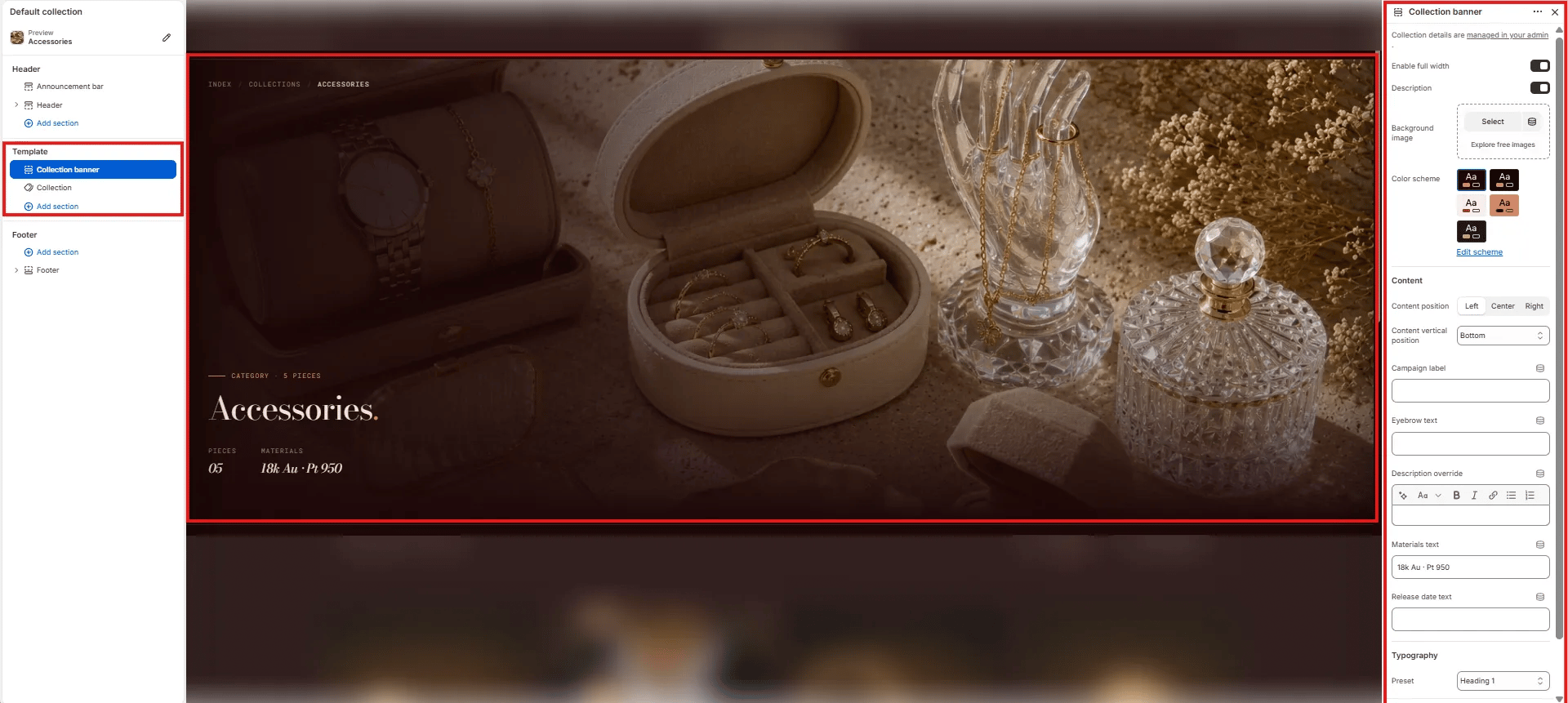 ### How to Add the Section
1. From your Shopify admin, go to **Online Store → Themes** and click **Customize**.
2. Navigate to a collection page.
3. Click **Add section** and select **Collection banner**.
4. Configure the settings below and click **Save**.
***
### Section Settings
#### Layout
* **Enable full width:** Toggle to extend the banner edge-to-edge across the viewport (default: on).
#### Content Toggles
* **Description:** Toggle to show or hide the collection description text pulled from Shopify admin below the heading.
#### Background
* **Background image:** Upload a custom background image for the banner. If no image is uploaded, the banner uses the collection image set in Shopify admin.
#### Style
* **Color scheme:** Choose a color scheme to control the banner's text and overlay colors.
#### Content
* **Content position:** Horizontal alignment of the overlay content — **Left**, **Center**, or **Right**.
* **Content vertical position:** Vertical alignment of the overlay content — **Bottom** (default), Center, or Top.
* **Campaign label:** Small label displayed above the collection name (e.g., "CATEGORY · 5 PIECES"). Use this for seasonal campaign tags or piece counts.
* **Eyebrow text:** A secondary small label above the main heading, separate from the campaign label.
* **Description override:** Rich text field to override the collection description from Shopify admin with custom copy for this template.
* **Materials text:** Short materials line displayed in the stats row below the heading (e.g., "18k Au · Pt 950").
* **Release date text:** Optional date or drop information displayed in the stats row (e.g., "Spring 2025").
#### Typography
* **Preset:** Choose the typographic style for the collection name heading (e.g., Heading 1).
### How to Add the Section
1. From your Shopify admin, go to **Online Store → Themes** and click **Customize**.
2. Navigate to a collection page.
3. Click **Add section** and select **Collection banner**.
4. Configure the settings below and click **Save**.
***
### Section Settings
#### Layout
* **Enable full width:** Toggle to extend the banner edge-to-edge across the viewport (default: on).
#### Content Toggles
* **Description:** Toggle to show or hide the collection description text pulled from Shopify admin below the heading.
#### Background
* **Background image:** Upload a custom background image for the banner. If no image is uploaded, the banner uses the collection image set in Shopify admin.
#### Style
* **Color scheme:** Choose a color scheme to control the banner's text and overlay colors.
#### Content
* **Content position:** Horizontal alignment of the overlay content — **Left**, **Center**, or **Right**.
* **Content vertical position:** Vertical alignment of the overlay content — **Bottom** (default), Center, or Top.
* **Campaign label:** Small label displayed above the collection name (e.g., "CATEGORY · 5 PIECES"). Use this for seasonal campaign tags or piece counts.
* **Eyebrow text:** A secondary small label above the main heading, separate from the campaign label.
* **Description override:** Rich text field to override the collection description from Shopify admin with custom copy for this template.
* **Materials text:** Short materials line displayed in the stats row below the heading (e.g., "18k Au · Pt 950").
* **Release date text:** Optional date or drop information displayed in the stats row (e.g., "Spring 2025").
#### Typography
* **Preset:** Choose the typographic style for the collection name heading (e.g., Heading 1).