> ## Documentation Index
> Fetch the complete documentation index at: https://sentiment-docs.arhamwebworks.com/llms.txt
> Use this file to discover all available pages before exploring further.
# Collection filter
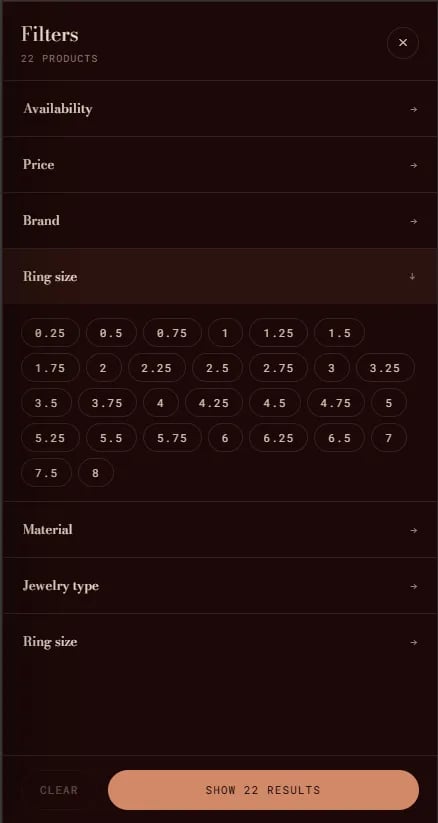
The **Collection Filter** is a slide-out filter and sort drawer built into collection pages. It allows customers to filter products by available metafields, tags, price, and availability, and to sort results by price, date, or relevance.
The collection filter is a built-in component embedded within the **Collection** section — it is not a standalone section. It is toggled via the **Show filter and sort** setting on the collection page section.
 ### How to Enable the Collection Filter
* From your Shopify admin, go to **Online Store → Themes** and click **Customize**.
* Navigate to a **Collection** template page.
* Select the **Collection** section in the left sidebar.
* Enable **Show filter and sort** to activate the filter toolbar.
* Click **Save**.
To configure which filters are available to customers, go to your Shopify Admin → **Search & Discovery app** → **Filters**, and enable the product attributes you want customers to be able to filter by.
### How to Enable the Collection Filter
* From your Shopify admin, go to **Online Store → Themes** and click **Customize**.
* Navigate to a **Collection** template page.
* Select the **Collection** section in the left sidebar.
* Enable **Show filter and sort** to activate the filter toolbar.
* Click **Save**.
To configure which filters are available to customers, go to your Shopify Admin → **Search & Discovery app** → **Filters**, and enable the product attributes you want customers to be able to filter by.