> ## Documentation Index
> Fetch the complete documentation index at: https://sentiment-docs.arhamwebworks.com/llms.txt
> Use this file to discover all available pages before exploring further.
# Contact form
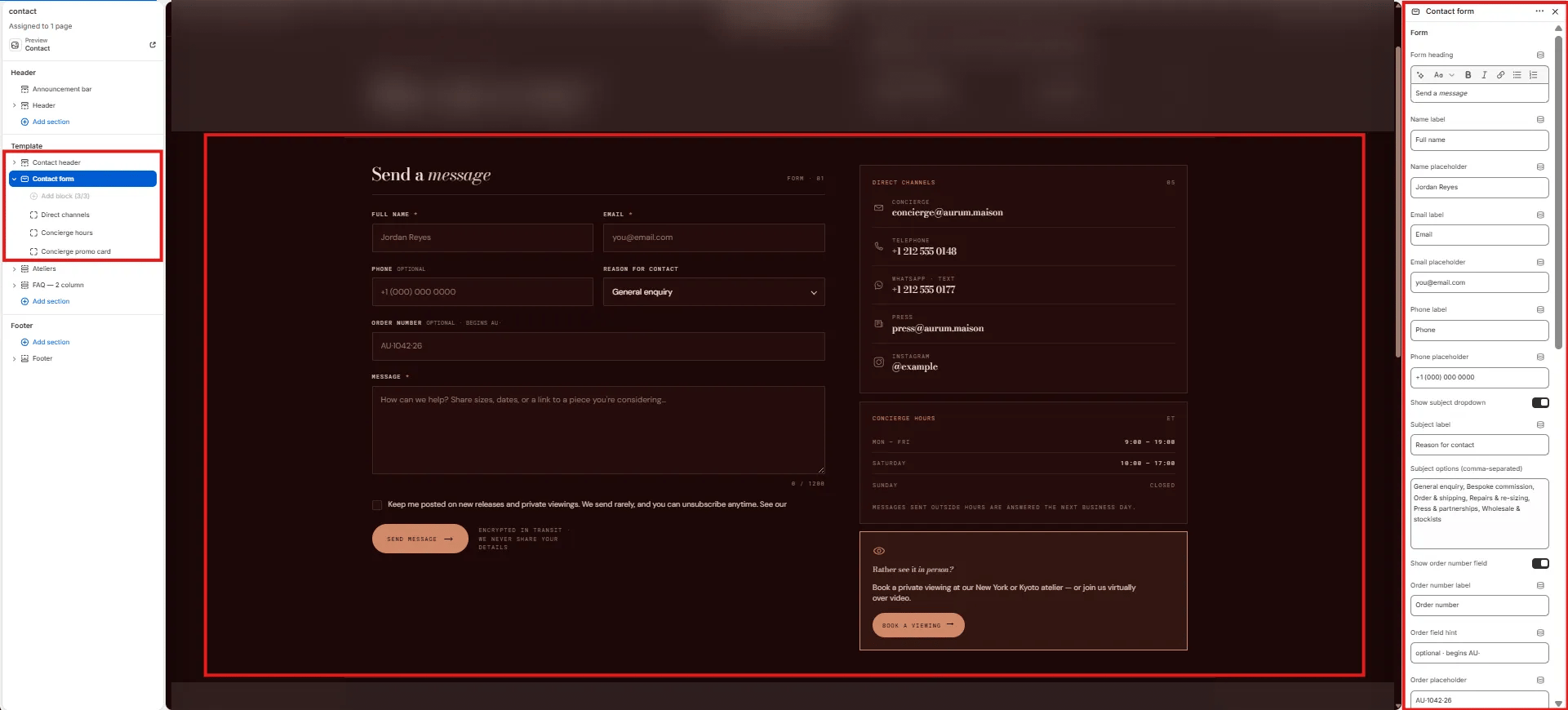
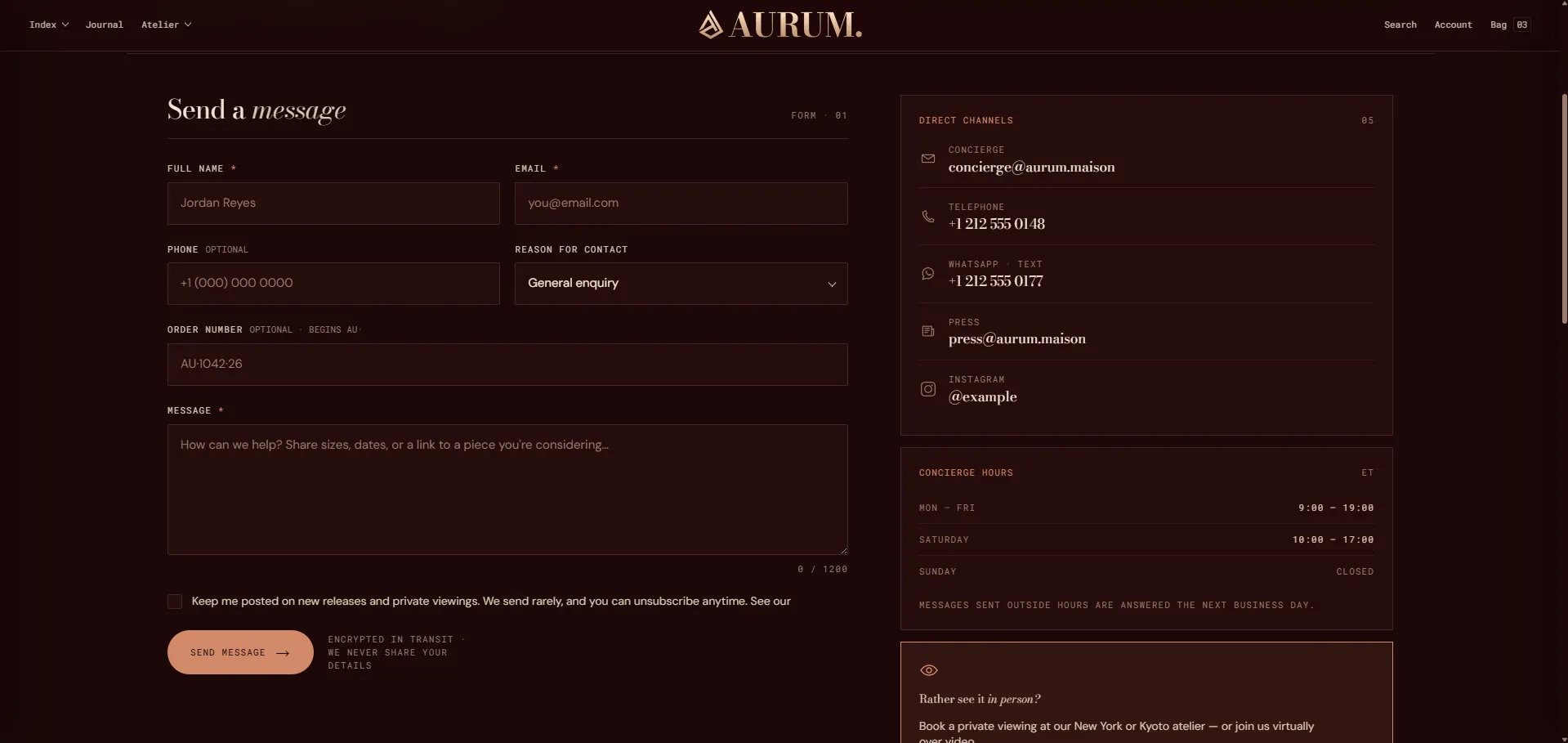
The **Contact Form** section provides a comprehensive inquiry form with configurable fields for name, email, phone, subject, order reference, message, and a consent checkbox. A flexible sidebar block system lets you display concierge information, opening hours, and contact channel links alongside the form — giving customers multiple ways to reach you.
 ### How to Add the Section
1. From your Shopify admin, go to **Online Store → Themes** and click **Customize**.
2. Navigate to your Contact page.
3. Click **Add section** and select **Contact form**.
4. Add sidebar blocks (Concierge, Hours, Channels) as needed.
5. Configure the form settings and click **Save**.
### Section Settings
#### Form Heading
* **Form heading:** The heading displayed above the form fields. Supports rich text formatting.
#### Form Fields
* **Name label / placeholder:** Label and placeholder text for the name input field.
* **Email label / placeholder:** Label and placeholder text for the email input field.
* **Phone label / placeholder:** Label and placeholder text for the phone number field.
* **Show subject:** Toggle to show or hide the subject selection dropdown.
* **Subject label:** The label shown above the subject dropdown.
* **Subject options:** Enter one option per line to populate the subject dropdown choices.
* **Show order field:** Toggle to show or hide an order reference input field.
* **Order label / hint / placeholder:** Label, hint text, and placeholder for the order reference field.
* **Message label / placeholder:** Label and placeholder for the message textarea.
* **Message max length:** Maximum character count for the message field (default: 1200).
* **Show consent:** Toggle to display a consent/privacy agreement checkbox.
* **Consent text:** The consent statement shown next to the checkbox.
* **Privacy URL:** Link to your privacy policy page.
#### Submission
* **Submit label:** Text displayed on the submit button.
* **Submit note:** A small note displayed below the submit button (e.g., response time expectations).
* **Channels heading:** Heading for the contact channels list in the sidebar.
#### Layout & Style
* **Layout:** Choose whether the form appears on the left with the sidebar on the right, or vice versa.
* **Color scheme:** Choose a color scheme for the section.
#### Spacing
* **Padding top / Padding bottom:** Control vertical spacing around the section.
***
### Concierge Block Settings *(limit 1)*
An info card displayed in the sidebar, ideal for a personal shopping or concierge service callout.
* **Concierge heading:** Heading for the card. Supports rich text.
* **Concierge body:** Body text for the card.
* **Concierge button label / URL:** Button label and link destination.
***
### Hours Block Settings *(limit 1)*
An opening hours table displayed in the sidebar.
* **Hours heading:** Heading displayed above the hours table.
* **Hours timezone:** Timezone label shown next to the table (e.g., "EST").
* **Rows 1–5 (Day / Time / Closed):** Up to 5 hours rows. Each row has a day label, a time string, and a "Closed" checkbox toggle.
* **Hours footer:** A footer note below the hours table (e.g., "All times local to studio").
***
### Channels Block Settings *(limit 1)*
A list of contact channels displayed in the sidebar.
* **Channel 1–5 (Icon / Label / Value / URL):** Each channel entry has an icon type (Email, Phone, WhatsApp, Press, Instagram, or Other), a display label, a value or handle, and a link.
### How to Add the Section
1. From your Shopify admin, go to **Online Store → Themes** and click **Customize**.
2. Navigate to your Contact page.
3. Click **Add section** and select **Contact form**.
4. Add sidebar blocks (Concierge, Hours, Channels) as needed.
5. Configure the form settings and click **Save**.
### Section Settings
#### Form Heading
* **Form heading:** The heading displayed above the form fields. Supports rich text formatting.
#### Form Fields
* **Name label / placeholder:** Label and placeholder text for the name input field.
* **Email label / placeholder:** Label and placeholder text for the email input field.
* **Phone label / placeholder:** Label and placeholder text for the phone number field.
* **Show subject:** Toggle to show or hide the subject selection dropdown.
* **Subject label:** The label shown above the subject dropdown.
* **Subject options:** Enter one option per line to populate the subject dropdown choices.
* **Show order field:** Toggle to show or hide an order reference input field.
* **Order label / hint / placeholder:** Label, hint text, and placeholder for the order reference field.
* **Message label / placeholder:** Label and placeholder for the message textarea.
* **Message max length:** Maximum character count for the message field (default: 1200).
* **Show consent:** Toggle to display a consent/privacy agreement checkbox.
* **Consent text:** The consent statement shown next to the checkbox.
* **Privacy URL:** Link to your privacy policy page.
#### Submission
* **Submit label:** Text displayed on the submit button.
* **Submit note:** A small note displayed below the submit button (e.g., response time expectations).
* **Channels heading:** Heading for the contact channels list in the sidebar.
#### Layout & Style
* **Layout:** Choose whether the form appears on the left with the sidebar on the right, or vice versa.
* **Color scheme:** Choose a color scheme for the section.
#### Spacing
* **Padding top / Padding bottom:** Control vertical spacing around the section.
***
### Concierge Block Settings *(limit 1)*
An info card displayed in the sidebar, ideal for a personal shopping or concierge service callout.
* **Concierge heading:** Heading for the card. Supports rich text.
* **Concierge body:** Body text for the card.
* **Concierge button label / URL:** Button label and link destination.
***
### Hours Block Settings *(limit 1)*
An opening hours table displayed in the sidebar.
* **Hours heading:** Heading displayed above the hours table.
* **Hours timezone:** Timezone label shown next to the table (e.g., "EST").
* **Rows 1–5 (Day / Time / Closed):** Up to 5 hours rows. Each row has a day label, a time string, and a "Closed" checkbox toggle.
* **Hours footer:** A footer note below the hours table (e.g., "All times local to studio").
***
### Channels Block Settings *(limit 1)*
A list of contact channels displayed in the sidebar.
* **Channel 1–5 (Icon / Label / Value / URL):** Each channel entry has an icon type (Email, Phone, WhatsApp, Press, Instagram, or Other), a display label, a value or handle, and a link.