> ## Documentation Index
> Fetch the complete documentation index at: https://sentiment-docs.arhamwebworks.com/llms.txt
> Use this file to discover all available pages before exploring further.
# Password page
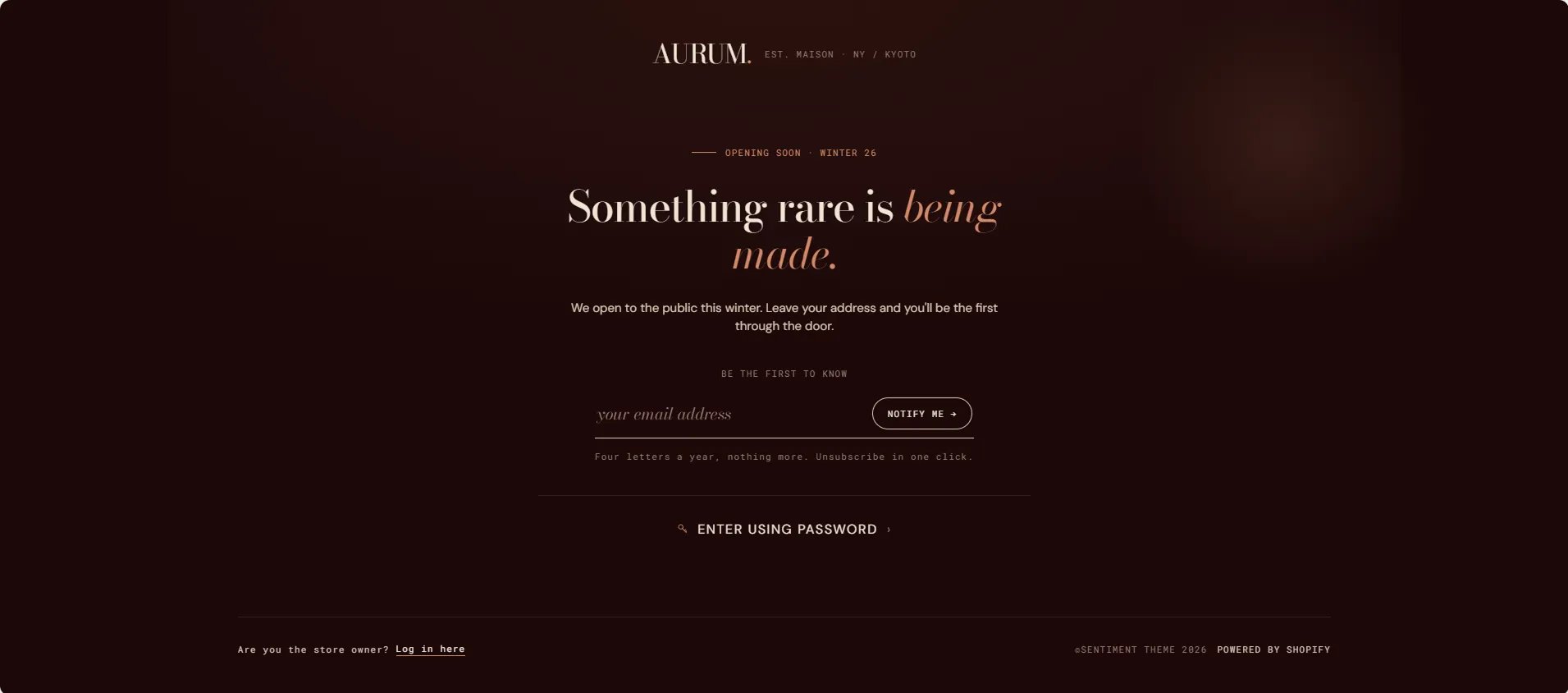
The **Password** page in the Sentiment theme is a single-section coming-soon screen that replaces your storefront while the store is password-protected. It features a branded logo bar, a centered eyebrow and editorial heading, a body paragraph, an email capture form, a disclaimer line, and an "Enter using password" link for authorised access. An optional media panel can display a background image alongside atmospheric quote and coordinate overlays.
 ### How to Configure the Password Page
1. From your Shopify admin, go to **Online Store → Themes** and click **Customize**.
2. From the top page dropdown, select **Password**.
3. Click **Password** in the left sidebar under **Template** to open its settings.
4. Click **Save** when done.
> To enable or disable password protection, go to **Shopify Admin → Online Store → Preferences → Password protection**.
***
### Password Section Settings
### How to Configure the Password Page
1. From your Shopify admin, go to **Online Store → Themes** and click **Customize**.
2. From the top page dropdown, select **Password**.
3. Click **Password** in the left sidebar under **Template** to open its settings.
4. Click **Save** when done.
> To enable or disable password protection, go to **Shopify Admin → Online Store → Preferences → Password protection**.
***
### Password Section Settings
 #### Layout
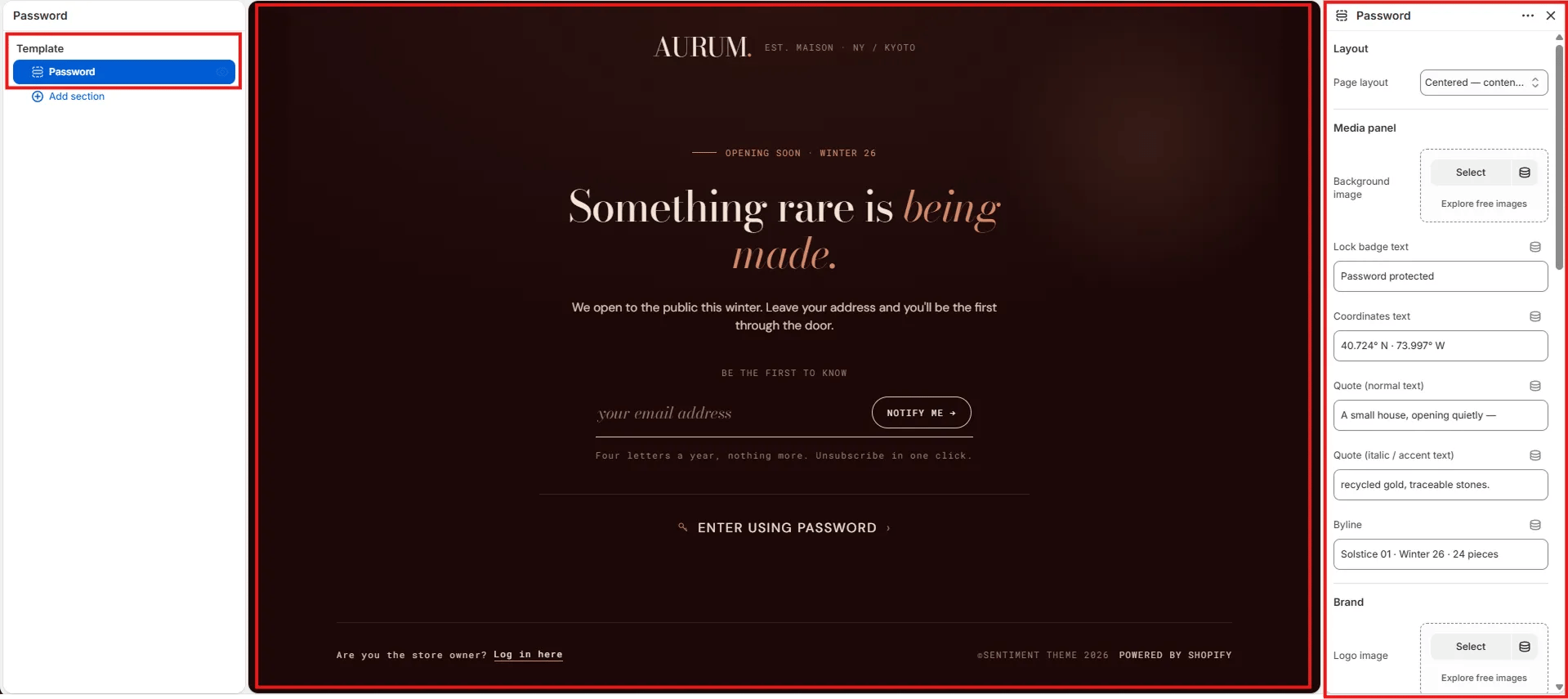
* **Page layout:** Choose the overall layout for the password page. Options include **Centered — content only** (full-screen centered form with background) and **Split — media panel** (form on one side, editorial media panel on the other).
#### Media Panel
Settings in this group control the atmospheric background and editorial overlay elements displayed on the page or in the media panel depending on the chosen layout.
* **Background image:** Upload a full-bleed background image for the page or media panel. Click **Explore free images** to browse Shopify's stock image library.
* **Lock badge text:** Small text shown next to the lock icon badge on the page (e.g., "Password protected").
* **Coordinates text:** Decorative geographic coordinates displayed as an atmospheric detail on the media panel (e.g., "40.724° N · 73.997° W").
* **Quote (normal text):** The regular-weight portion of the editorial quote overlay on the media panel (e.g., "A small house, opening quietly —").
* **Quote (italic / accent text):** The italic or accent-colour portion of the quote (e.g., "recycled gold, traceable stones.").
* **Byline:** Small text displayed below the quote — typically used for collection or season information (e.g., "Solstice 01 · Winter 26 · 24 pieces").
#### Brand
* **Logo image:** Upload a custom logo image to display at the top of the password page. If left blank, the store name is displayed as text.
* **Logo tagline:** Short brand descriptor displayed next to the logo (e.g., "EST. MAISON · NY / KYOTO").
#### Content
* **Eyebrow label:** Small label displayed above the main heading (e.g., "Opening soon · Winter 26").
* **Heading (normal text):** The regular-weight portion of the main heading (e.g., "Something rare is").
* **Heading (italic / accent text):** The italic or accent-colour portion of the heading (e.g., "*being made.*").
* **Body text:** Supporting paragraph displayed below the heading (e.g., "We open to the public this winter. Leave your address and you'll be the first through the door.").
#### Email Form
* **Form label:** Small uppercase label displayed above the email input (e.g., "Be the first to know").
* **Email placeholder:** Placeholder text inside the email input field (e.g., "your email address").
* **Submit button label:** Label on the subscribe button (e.g., "Notify me →").
* **Disclaimer text:** Small text displayed below the form — typically used for frequency or privacy notes (e.g., "Four letters a year, nothing more. Unsubscribe in one click.").
#### Password Link
* **Password link label:** Text for the "Enter using password" link shown below the email form (e.g., "Enter using password"). Leave blank to hide.
#### Layout
* **Page layout:** Choose the overall layout for the password page. Options include **Centered — content only** (full-screen centered form with background) and **Split — media panel** (form on one side, editorial media panel on the other).
#### Media Panel
Settings in this group control the atmospheric background and editorial overlay elements displayed on the page or in the media panel depending on the chosen layout.
* **Background image:** Upload a full-bleed background image for the page or media panel. Click **Explore free images** to browse Shopify's stock image library.
* **Lock badge text:** Small text shown next to the lock icon badge on the page (e.g., "Password protected").
* **Coordinates text:** Decorative geographic coordinates displayed as an atmospheric detail on the media panel (e.g., "40.724° N · 73.997° W").
* **Quote (normal text):** The regular-weight portion of the editorial quote overlay on the media panel (e.g., "A small house, opening quietly —").
* **Quote (italic / accent text):** The italic or accent-colour portion of the quote (e.g., "recycled gold, traceable stones.").
* **Byline:** Small text displayed below the quote — typically used for collection or season information (e.g., "Solstice 01 · Winter 26 · 24 pieces").
#### Brand
* **Logo image:** Upload a custom logo image to display at the top of the password page. If left blank, the store name is displayed as text.
* **Logo tagline:** Short brand descriptor displayed next to the logo (e.g., "EST. MAISON · NY / KYOTO").
#### Content
* **Eyebrow label:** Small label displayed above the main heading (e.g., "Opening soon · Winter 26").
* **Heading (normal text):** The regular-weight portion of the main heading (e.g., "Something rare is").
* **Heading (italic / accent text):** The italic or accent-colour portion of the heading (e.g., "*being made.*").
* **Body text:** Supporting paragraph displayed below the heading (e.g., "We open to the public this winter. Leave your address and you'll be the first through the door.").
#### Email Form
* **Form label:** Small uppercase label displayed above the email input (e.g., "Be the first to know").
* **Email placeholder:** Placeholder text inside the email input field (e.g., "your email address").
* **Submit button label:** Label on the subscribe button (e.g., "Notify me →").
* **Disclaimer text:** Small text displayed below the form — typically used for frequency or privacy notes (e.g., "Four letters a year, nothing more. Unsubscribe in one click.").
#### Password Link
* **Password link label:** Text for the "Enter using password" link shown below the email form (e.g., "Enter using password"). Leave blank to hide.