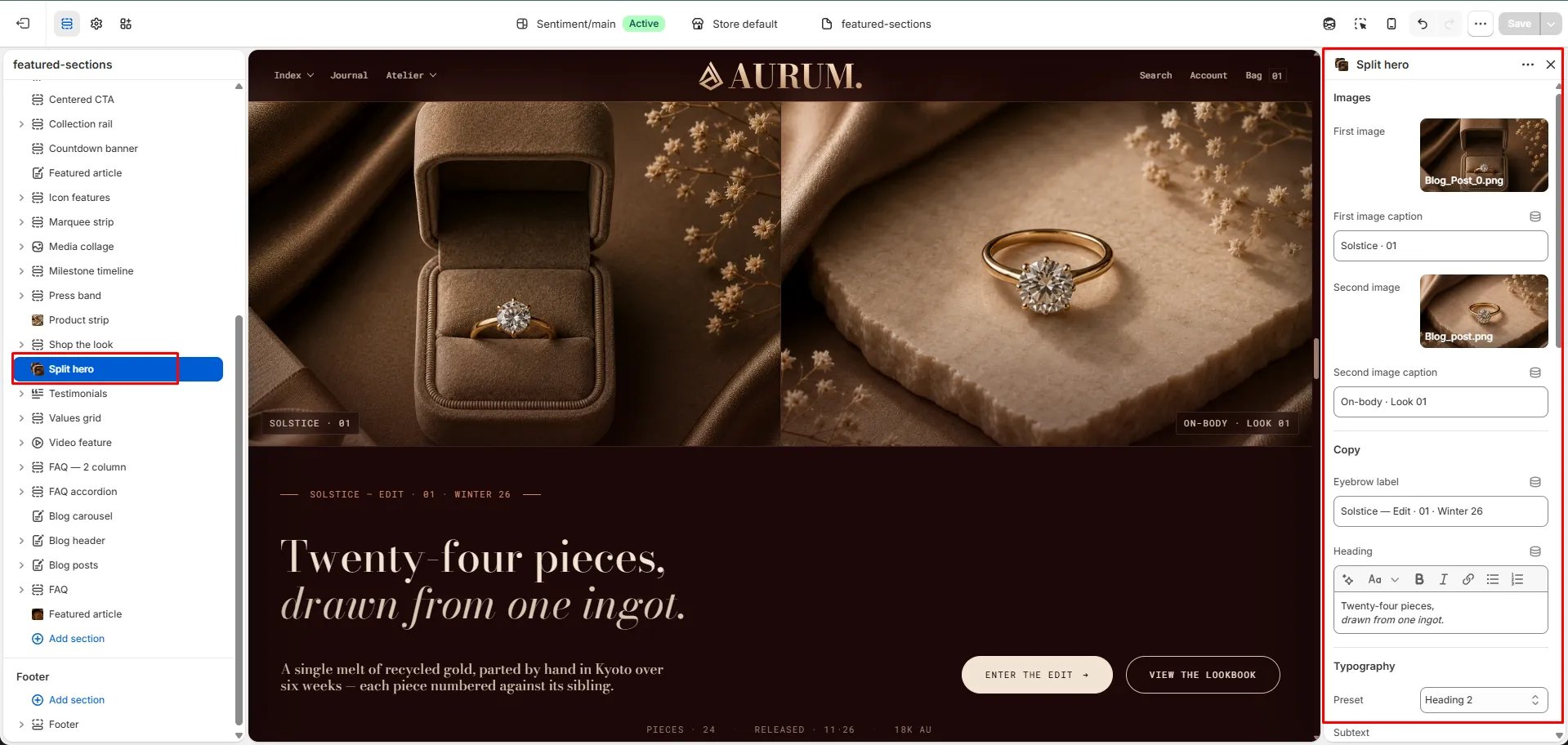
How to Add the Section
- From your Shopify admin, go to Online Store → Themes and click Customize.
- Navigate to the page where you want to add this section.
- Click Add section and select Split hero.
- Upload both images and fill in the content, CTAs, and metadata fields.
- Click Save.
Section Settings
Images
- Image 1: Upload the left panel image.
- Caption 1: A caption label displayed on the first image (e.g., “Solstice · 01”).
- Image 2: Upload the right panel image.
- Caption 2: A caption label displayed on the second image (e.g., “On-body · Look 01”).
Content
- Eyebrow: Small label above the heading.
- Heading: Main hero heading. Supports rich text and italic emphasis.
- Heading typography: Select the typographic style for the heading.
- Subtext: Supporting body text displayed below the heading.
Call to Action
- CTA 1 text / URL: Primary CTA button label and link.
- CTA 2 text / URL: Secondary CTA button label and link.
Metadata
- Meta 1 / 2 / 3: Three metadata labels displayed below the CTAs (e.g., “Pieces · 24”, “Released · 11·26”, “18k Au”).
Style
- Color scheme: Choose a color scheme for the section.
Spacing
- Padding top / Padding bottom: Control vertical spacing around the section.